Building a RAG with Laravel
Lately I’ve been studying AI: how to write more efficient prompts, how to build a RAG, and how to fine-tune an AI model. And, in order to solidify my knowledge, I decided to build a project with Laravel where I can practice in a more concrete way. Especially because nowadays, all anyone talks about is AI, but I don’t see much content in Portuguese about how to build a RAG with PHP.
My goal with this post is to build a very simple RAG, where I can show in detail the whole creation process. It would be a basic project, but one that will serve as a foundation for future posts. I want to gradually implement new features in this project and document each step I take.
So, without further ado, let’s begin!
What is RAG?
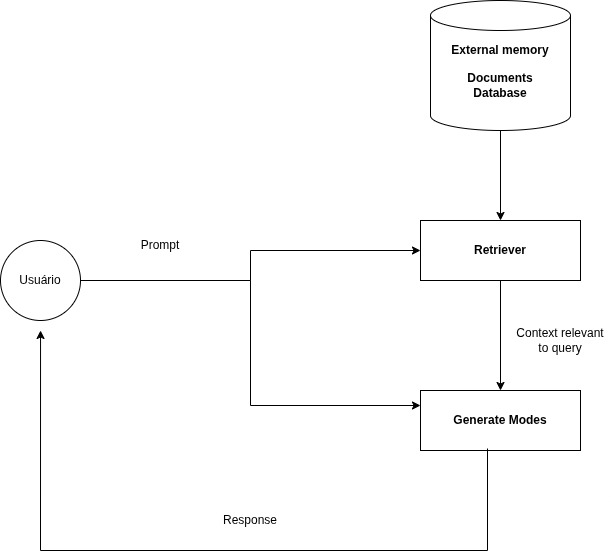
RAG (Retrieval-Augmented Generation) is a technique used to improve the quality of an AI model’s responses. With this technique, you can expand the amount of information your model can use.
We use RAG when we need specific and up-to-date information, such as reading company documentation, accessing data in a database, or for example, in a support system. If we don’t use this technique, the model can generate hallucinations or inconsistencies in its responses.
Setting up the environment
To continue with our project, we need to install Laravel and ollama-php. First, we’ll install Laravel using Composer:
composer create-project laravel/laravel rag-laravel
cd rag-laravel
After installing Laravel, we install arda-ollama. This package is a library that allows you to access Ollama directly from PHP.
composer require ardagnsrn/ollama-phpSince we have Laravel and the package properly installed, we’ll install Ollama and run a model.
For this example, I’m using the qwen2.5:1.5b model, on Ubuntu 22.04, and using Markdown files.
If you’re using a different operating system, I recommend visiting Ollama’s site and following the installation instructions:
Run the command below to install Ollama:
curl -fsSL https://ollama.com/install.sh | shAfter installing Ollama, let’s run the model. To do that, we use the command to pull the model:
ollama pull qwen2.5:1.5bThe choice of qwen2.5:1.5b was made because most people don’t have a very powerful computer, and this model tends to run better on machines with fewer resources.
On the other hand, since it’s smaller, it may take a bit longer to respond and its quality may be lower when compared to larger models.
Indexing the documents
Now, with almost everything set up, it’s time to roll up our sleeves. First, we’ll read the documents that will be used in our RAG, then create an embedding for each of them, and save them in the database.
But before starting, it’s important to understand how embeddings work and why they’re necessary.
The embedding technique allows us to represent texts in a way that the model can better understand their meaning.
If, for example, we send a very large book directly to the model, the amount of information can be so large that it may end up generating responses different from what we expect.
That’s why we create an embedding for each file (and, if necessary, split the text into chunks to improve accuracy) and store those embeddings in the database.
When the user asks a question, that question is also converted into an embedding. The system then computes a similarity between the question’s embedding and the embeddings stored in the database, returning the most relevant passages to build the answer.
Now, go into the project directory and let’s create a Laravel command to generate the embeddings.
php artisan make:command embeddingBefore starting to create embeddings with more advanced tools, like the qwen2.5:1.5b-embedding model, it’s worth understanding the concept of embeddings in a simple way first.
To illustrate this, we can create a basic PHP function and add it to the file created earlier:
private function gerarembeddingimples(string $texto): array
{
    // Splits the text into unique, sorted words
    $palavras = array_unique(str_word_count(strtolower($texto), 1));
    sort($palavras);

    // Creates a simple numeric hash (mock embedding)
    return array_map(fn($p) => crc32($p) % 1000 / 1000, $palavras);
}
Step-by-step explanation
- Text normalization:
The code lowercases everything and splits into unique words.
$palavras = array_unique(str_word_count(strtolower($texto), 1));This ensures “PHP” and “php” are treated as the same word.
- Sorting:
This way, the result is predictable — two sentences with the same words will have the same “embedding.”
sort($palavras);- Creating the numeric vector:
array_map(fn($p) => crc32($p) % 1000 / 1000, $palavras);Each word is turned into a number using crc32. That number is reduced to something between 0 and 1 — simulating the behavior of a real embedding, which is also a list of floating-point numbers.
- Result:
With this, we’ll get something like the following:
[0.234, 0.678, 0.912]Add the code below inside the embedding command. In this code we specify the directory where our documents are, generate the embedding for each file, and save everything in the database.
public function handle(): void
{
    $arquivos = glob('/var/www/projeto/ollama-php/docs/*.md');
    foreach ($arquivos as $arquivo) {
        $conteudo = file_get_contents($arquivo);
        $this->info($arquivo);
        $embedding = $this->gerarembeddingimples($conteudo);
        DB::table('documents_embedding')->insert([
            'filename' => basename($arquivo),
            'content' => $conteudo,
            'embedding' => json_encode($embedding),
        ]);
    }
}
Full example of the embedding command:
<?php

namespace App\Console\Commands;

use Illuminate\Console\Command;
use Illuminate\Support\Facades\DB;

class embedingsCommand extends Command
{
    protected $signature = 'embedings';

    protected $description = 'Command description';

    public function handle(): void
    {
        $arquivos = glob('/var/www/projeto/ollama-php/docs/*.md');
        foreach ($arquivos as $arquivo) {
            $conteudo = file_get_contents($arquivo);
            $embedding = $this->gerarembeddingimples($conteudo);
            DB::table('documents_embedding')->insert([
                'filename' => basename($arquivo),
                'content' => $conteudo,
                'embedding' => json_encode($embedding),
            ]);
        }
    }

    private function gerarembeddingimples(string $texto): array
    {
        // Splits the text into unique, sorted words
        $palavras = array_unique(str_word_count(strtolower($texto), 1));
        sort($palavras);

        // Creates a simple numeric hash (mock embedding)
        return array_map(fn($p) => crc32($p) % 1000 / 1000, $palavras);
    }
}
Searching content by similarity
Now that we have the documents embedded in the database, it’s time to perform the search. But before that, we need to create a function to compute the similarity between two embeddings.
What is similarity?
It’s a measure that indicates how similar two texts, sentences, words, or vectors are.
It doesn’t only compare identical letters or words, but rather the meaning and structure of the text.
Example:
Text A: "The cat is sleeping on the couch"
Text B: "A feline is resting on the couch"
They differ in words but are very similar in meaning.
An embedding model (like the ones used in RAG) generates vectors that end up close to each other in the vector space when the texts have similar meanings. When that happens, the similarity between those vectors will be high — for example, 0.92 on a scale of 0 to 1.
Our snippet of the similarity function:
private function similaridade(array $a, array $b): float
{
    $inter = count(array_intersect(array_keys($a), array_keys($b)));
    return $inter / max(count($a), count($b));
}
Step-by-step explanation
- We take only the keys of the two arrays:
array_keys($a) and array_keys($b)- It returns the intersection of the array:
array_intersect(array_keys($a), array_keys($b))- Counts the number of words:
count(array_intersect(array_keys($a), array_keys($b)));- Computes the proportion of keys that are equal between the two arrays:
$inter / max(count($a), count($b));The result is a number between 0 and 1, where values closer to 1 indicate higher similarity.
Building the chat
Run the command below to create the chat:
php artisan make:command chat-testCopy and paste the code below into the created file:
<?php

namespace App\Console\Commands;

use Illuminate\Console\Command;
use Illuminate\Support\Facades\DB;
use function Laravel\Prompts\textarea;
use function Laravel\Prompts\select;

class chatCommand extends Command
{
    protected $signature = 'chat-test';

    protected $description = 'Command description';

    public function handle()
    {
        $client = \ArdaGnsrn\Ollama\Ollama::client();

        $pergunta = textarea('Write here');
        $embeddingPergunta = $this->gerarembeddingimples($pergunta);

        // Load embeddings from the database
        $documentos = DB::table('documents_embedding')->get();

        $ranked = [];
        foreach ($documentos as $doc) {
            $emb = json_decode($doc->embedding, true);
            $ranked[$doc->id] = $this->similaridade($embeddingPergunta, $emb);
        }
        // Sort by similarity
        arsort($ranked);

        // Take the top 3
        $topDocs = collect(array_keys($ranked))->take(3)
            ->map(fn($id) => $documentos->firstWhere('id', $id))
            ->pluck('content')
            ->implode("\n\n");
        // Build the prompt with the combined context
        $prompt = "You are an assistant that only answers based on the content below.
    If the answer is not present in the content, say: 'Sorry, the answer to this question is not available in this document.'.\n\n" .
            "---\n" . $topDocs . "---\n\n" .
            "Question: $pergunta";

        $response = $client->chat()->create([
            'model' => 'qwen2.5:3b',
            'messages' => [
                ['role' => 'user', 'content' => $prompt],
            ],
        ]);

        $resultado = $response->message->content;
        dd($resultado);
    }

    // Computes similarity (simplified cosine-like)
    private function similaridade(array $a, array $b): float
    {
        $inter = count(array_intersect(array_keys($a), array_keys($b)));
        return $inter / max(count($a), count($b));
    }

    private function gerarembeddingimples(string $texto): array
    {
        // Splits the text into unique, sorted words
        $palavras = array_unique(str_word_count(strtolower($texto), 1));
        sort($palavras);

        // Creates a simple numeric hash (mock embedding)
        return array_map(fn($p) => crc32($p) % 1000 / 1000, $palavras);
    }
}
Since the code above can be a bit complex, let me walk you through it step by step:
Step-by-step explanation
- We instantiate the client we’ll use to connect to Ollama:
$client = \ArdaGnsrn\Ollama\Ollama::client();- We create a textarea for the user to type the question:
$pergunta = textarea('Write here');- We create the embedding of the question, so we can compute the similarity:
$embeddingPergunta = $this->gerarembeddingimples($pergunta);- We fetch the embedded documents from the database and store them in a variable:
$documentos = DB::table('documents_embedding')->get();- Now we compute the similarity between the question’s embedding and the embeddings of the files in the database. Then, we add the document id and the similarity result to the array.
$ranked = [];
foreach ($documentos as $doc) {
    $emb = json_decode($doc->embedding, true);
    $ranked[$doc->id] = $this->similaridade($embeddingPergunta, $emb);
}- We sort by similarity:
arsort($ranked);- Now we filter, bringing only the top 3.
$topDocs = collect(array_keys($ranked))->take(3)
    ->map(fn($id) => $documentos->firstWhere('id', $id))
    ->pluck('content')
->implode("\n\n");- We build the prompt by combining the system prompt + the user’s prompt + the context, which is nothing more than the files we retrieved in step 7:
$prompt = "You are an assistant that only answers based on the content below.
    If the answer is not present in the content, say: 'Sorry, the answer to this question is not available in this document.'.\n\n" .
    "---\n" . $topDocs . "---\n\n" .
"Question: $pergunta";- Now we’ll create the model and pass the prompt to it, so it can generate the response:
$response = $client->chat()->create([
    'model' => 'qwen2.5:3b',
    'messages' => [
        ['role' => 'user', 'content' => $prompt],
    ],
]);- Now we grab the response and display it in the console:
$resultado = $response->message->content;
$this->info($resultado);
Running the RAG via command
First, let’s create a table in the database to store the embeddings:
Migration file to create the table:
<?php

use Illuminate\Database\Migrations\Migration;
use Illuminate\Database\Schema\Blueprint;
use Illuminate\Support\Facades\Schema;

return new class extends Migration {
    public function up(): void
    {
        Schema::create('documents_embedding', function (Blueprint $table) {
            $table->id();
            $table->string('filename');
            $table->text('content');
            $table->json('embedding'); // array of floats
            $table->timestamps();
        });
    }

    public function down(): void
    {
        Schema::dropIfExists('documents_embedding');
    }
};
Run the command to create the table:
php artisan migrateNow, with our code finished, we can run the command to see the result. First, we run the command responsible for inserting the embeddings into the database:
php artisan embbedingThen, with the files inserted in the database, we can run the chat command:
php artisan chatWe can type the question and see the result.
Notes
In my tests, I asked a few questions that took quite a while to answer, since we’re using a very simple model — just to illustrate how RAG works.
Some questions it wasn’t able to answer based on the document, but that was already expected.
Even when you create embeddings, the file can still be too large for the model to interpret, which can generate inconsistencies or even hallucinations in the response.
To improve that, here are some steps we can take to try to improve the model:
- Create chunks of each file, using some strategy like splitting each file into chunks of 500 or 1000 words.
- Improve our system prompt that we send along with the context and the user’s question.
- Fine-tune the model to improve the results.
In the end, we still have a lot to evolve and improve in our model, but over time we’ll keep learning and adjusting.
These are topics we’ll cover in the next posts.
To not miss the next publications, you can follow me on social media.
Project link: https://github.com/dtgfranca/simple-rag-with-laravel
💬 Comentários